Previous slide Next slide Toggle fullscreen Open presenter view
Week-3: Cybersecurity Fundamental Module
Credits: 20

Module Tutor: Ali Jaddoa, PhD, MSc, BSc, PgCert

Lecture Name: Access Control
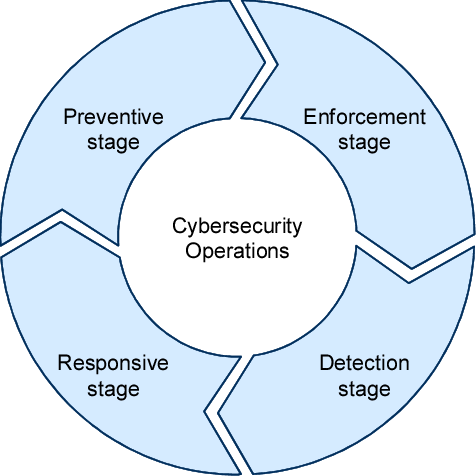
Operational Model of Cybersecurity
101
A principal is an entity that has an authenticated identity
A subject is an entity that acts on behalf of a principal, within a computer system.
An action can read, write, create, delete objects or their metadata. For computer programs, actions can also execute.
An object is a resource that an action is to be performed upon
What is Access Control?
It's the process of determining and enforcing who can access what resources in a system.
Access Control the ability to control whether a subject (such as an individual or a process running on a computer system) can interact with an object (such as a file or hardware device)
Importance : Protects sensitive information, prevents unauthorised access, and ensures compliance with regulations.
But, does it confused with Authentication ?
Authentication vs. Access Control: Not the Same!
Authentication deals with verifying the identity of a subject.
Authentication : Think of it as logging into your computer with a username and password.
The system (authentication) checks your credentials to ensure you are who you say you are. Just like showing your ID to prove your identity.
Access Control : Now, once you're in, what can you do?
AC determines what you can access on the computer or network.
Just because you logged in doesn't mean you can access all files and applications.
AC Principles
Cybersecuity: CIA - Confidentiality, Integrity, Availability
The four parts of access control are:
Identification - Who : is asking to access the asset?
Authentication - Can : the requestor’s identity be verified?
Authorisation - What :exactly, can the requestor access? And what can they do?
Accountability - How can actions be traced to an individual?
Associating actions with users for later reporting and research is known as accountability.
AC Principles
These four parts are divided into two phases:
The policy definition : This phase determines who has access and what systems or resources they can use. The authorisation definition process operates in this phase.
The policy enforcement : grants or rejects requests for access based on the authorisations defined in the first phase. The identification , authentication ,authorisation execution , and accountability processes operate in this phase.
Example: Linux Permissions
Access Control Models
1. Discretionary Access Control (DAC)
2. Mandatory Access Control (MAC)
3. Rule-Based Access Control (RuBAC)
4. Role-Based Access Control (RBAC)
5. Access Control Lists(ACL)
1. Discretionary Access Control (DAC)
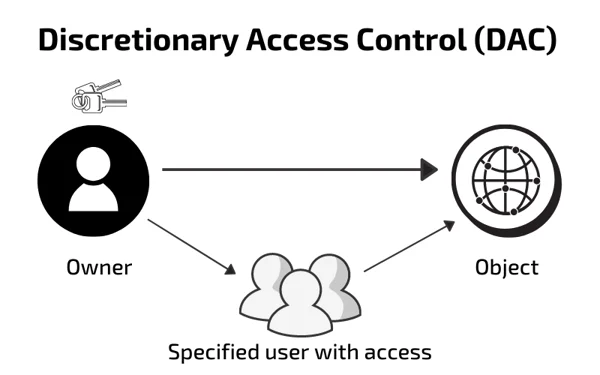
Access rights are determined by the resource owner.
Mechanism : Owners grant or deny access to users based on their discretion.
Sys Admin is the boss (or owner of the file)
Characteristics :
Flexibility : Owners have control over their resources.Vulnerability : Prone to accidental or malicious misuse.Users can set read, write, and execute permissions for files they own.
DAC: E.g.
OS: Permission settings in Unix/Linux.
App:
Application-based DAC denies access based on context or content.
ATM's available options to a user.
DAC: Cont'
Scenario : Ameer owns a file and grants read access to Bob but denies access to Tim.
Pros Cons
Flexibility for resource ownersHigher security risks due to potential sharing
Ease of useLack of centralised control
Granular control over permissionsUnintended privilege escalation
Widely supported by OSsNot suitable for critical environments
2. Mandatory Access Control (MAC)
Access rights are regulated by a central authority based on multiple levels of security.
Mechanism : Users and resources are assigned security labels. Access is granted based on these labels and policies.
SysAdmin is no longer the boss:
Characteristics : High security: Strict and non-discretionary control.
Complexity : Requires careful planning and management.
Occasionally synonymous with MLS - Multi-Level Security (Unclassified, Confidential, Secret, Top Secret)
MAC Cont'
Scenario : Bob has a "Secret" clearance and can access "Secret" documents, but not "Top Secret" ones.
Example : Military systems with classified information, e.g. Bell LaPadula
Users need the appropriate clearance level to access certain documents.System and owner collaboration determines access.
Bell-LaPadula model compares subject and object labels to grant/deny access
Activity
In pairs so a quick bit of research on Mandatory Access Control (MAC) to answers in small groups or post them online.
Where is MAC used in the real world? Give one example.
Why might an organisation choose MAC instead of other access models?
What could be a downside of using MAC?
3. Rule-Based Access Control (RuBAC)
Access is based on a set of pre-defined rules or policies, rather than roles or individual user attributes.
Provides fine-grained access control by enforcing rules that specify conditions under which access is granted or denied.
Data owners make or allow the rule.
RuBAC:Key Features
Rules and Policies: Access decisions are made based on a comprehensive set of rules.Conditions : Rules can include conditions such as time of day, IP address, and user attributes (PAM in Linux).Automation : Automatically enforces policies without manual intervention.
System Example: PAM (Pluggable Authentication Modules)
It allows system administrators to define and manage how different applications or services authenticate users without needing to modify the applications themselves.
By using different methods (like passwords, fingerprints, or two-factor authentication)
Activity: In pairs
Find one real example where rule-based access is used?
What kind of rules could a system use to allow or block access?
What are the benefits and challenges of using rules instead of roles?
4. Role-Based Access Control (RBAC)
It bases access control approvals on the jobs the user is assigned
Simplifies administration and enhances security by grouping permissions by role rather than assigning them individually.
RBAC: Example
Role Engineering : Before you can assign access rules to a role, you must define and describe the roles in your organisation.Risks: Overgeneralising .
Which leads to "a need-to-know violation "
5. Access Control Lists(ACL)
A set of rules that defines what actions (e.g., read, write, execute) specific users or groups can perform on system objects (like files or network devices).
Used in operating systems (like Linux) and network devices (such as routers and firewalls) to enforce access permissions.
Key Features of ACLs:
Granular Control : Allows specific access permissions for individual users or groups.Flexibility : Multiple rules can be applied to the same resource, allowing for fine-tuned access management.Application : Common in both file system permissions (e.g., Unix/Linux) and network security.
Effects of Breaches in Access Control
Failure to implement robust access control
Disclosure of sensitive information and data integrity corruptionLoss of intelligence and system and process failureShort-term and long-term attacks
Threats to Access Controls
Challenges: threats evolve all the time
The list can never be complete.
1. Gaining physical access
2. Reusing or discarding media
3. Eavesdropping by observation
4. Electronic eavesdropping
5. Bypassing security
6. Intercepting communication
7. Exploiting hardware and software
8. Accessing networks
9. Exploiting applications
Centralised and Decentralised Access Control1. Centralised Access Control: CAC
Single Point of ControlConsistency: uniformly applied across all users and systemsEase of Management: easily update or change policiesScalability: Suitable for large organisations
Pros & Cons
Advantages Disadvantages
Simplified Administration : Easier to manage and enforce security policies from a central point.Single Point of Failure : If the central control system fails, it could disrupt access control across the entire organisation.
Consistent Security : Ensures uniform application of security policies and standards.Potential Bottlenecks : All access control decisions must go through the central authority, which can lead to delays.
Improved Monitoring : Centralised logging and monitoring of access events and policy violations.Scalability Issues : May become less efficient as the organisation grows and the number of access requests increases.
CAC and AAA
CAC is applied and enforced
Less Administration Time : maintained on a single host.Reduced Design Errors : Consistent formatsSimplified Training : Only one system needs to be learned by admin.Improved Compliance Auditing : access requests are handled by one system.Fewer Help-Desk Calls : A consistent user interface reduces confusion.
Types of AAA Servers:
A. Remote Authentication Dial-In User Service RADIUS ): networking protocol that provides centralised AAA management (passwords, tokens, certificates)
Client Configuration File : Contains client address and shared secret for transaction authentication.User Configuration File : Contains user identification, authentication data, and connection/authorisation information.
Others
Let's do some reseach for SAML (Security Assertion Markup Language)?
Centralised and Decentralised Access Control
2. Decentralised Access Control DeAC
is to handle access control decisions and administration locally.
access control is in the hands of the people (e.g.managers who are closest to the system users)
Eliminates the single-point-of failure problem.
BUT, Loss of standardisation and to overlapping rights.
Decentralised Access Control DeAC: common examples
Password Authentication Protocol (PAP) : Uses cleartext usernames and passwords.Challenge-Handshake Authentication Protocol (CHAP) : Hashes passwords with a one-time challenge to prevent replay attacks.OATH (Open Authentication) : Over 30 organisations contribute to developing authentication standards:
HMAC-based One-Time Password (HOTP) : Uses an authentication server for generating one-time passwords.Time-based One-Time Password (TOTP) : Combines a time stamp with a hashed value to enhance security.
HMAC : Hash-based Message Authentication Code
Thoughts :
Policies alone do not suffice. Employers must clearly communicate what employees can and cannot do.
The best way to do this is through training. When systems or policies change, those changes should be communicated to employees.
PAM: Pluggable Authentication Modules
It is a flexible system used to manage authentication for applications and services.
Provides a way to centralise and standardisa authentication methods, allowing the system to enforce authentication policies across different services.
Why PAM Matters
Modular Design : Different authentication modules (e.g., password, token, biometrics) can be easily added or removed.Service-Specific Control : PAM configurations allow different services (e.g., SSH, sudo) to have their own tailored authentication rules.Security : Enforces consistent security policies and simplifies multi-factor authentication setup (MFA).
How PAM Works:
PAM Modules : Each module performs a specific task (e.g., authentication, account management).
Control Flags : Determines how PAM processes multiple modules. Flags include:
Flag Meaning Behaviour
requiredMust pass
Login fails if it doesn’t, even if later modules succeed
requisiteMust pass or stop
Authentication stops immediately if it fails
sufficientOne success is enough
Skips the rest if it passes
optionalMinimal impact
Used for logging or secondary checks
Example PAM Configuration:
Located in /etc/pam.d/
Each service has a configuration file (e.g., login, sshd).
auth required pam_unix.so
auth sufficient pam_google_authenticator.so
Further reading about PAM:
---
### DAC's Permission Levels
Permission levels indicate a subject’s rights to a system, application, network, or other
resources.
- **User-based**: permissions granted to a **user**.
- **Job**-**based**, **group**-based, or **role**-based access control (RBAC): Permissions are
based on a common set of permissions for all people in the **same** or similar **job** **roles**.
- **Project-based**: Only project team has access
- **Task-based**: **limits** a **person** to **executing** certain **functions**
and often enforces mutual exclusivity.
---
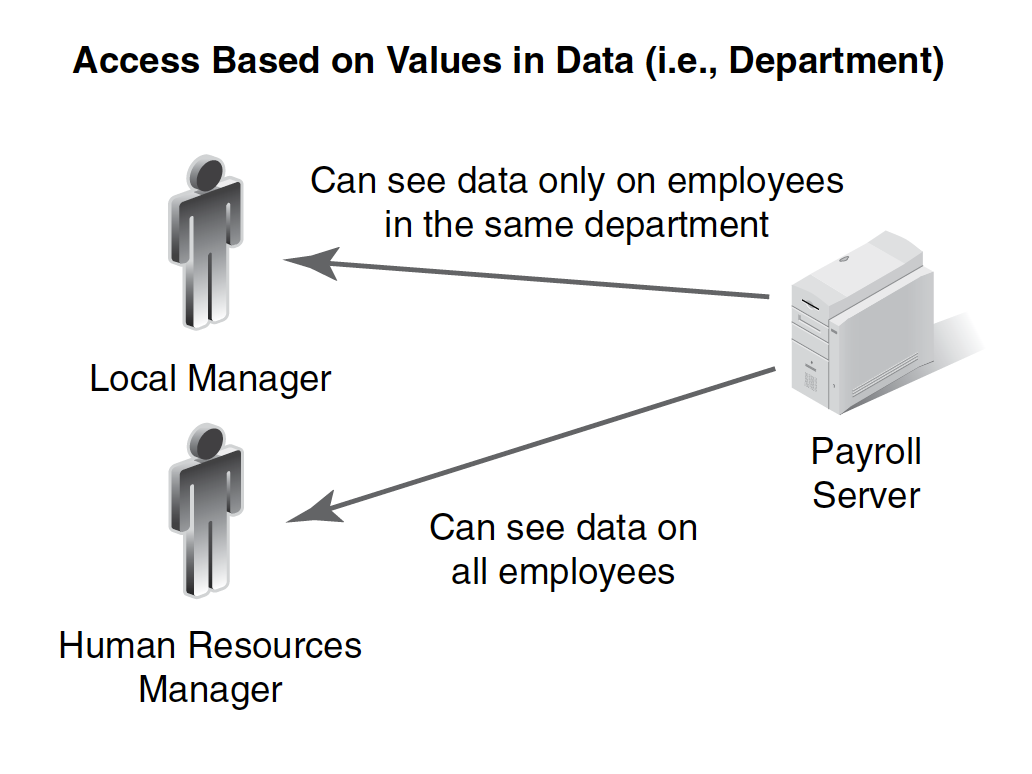
## Others: Content-Dependent Access Control
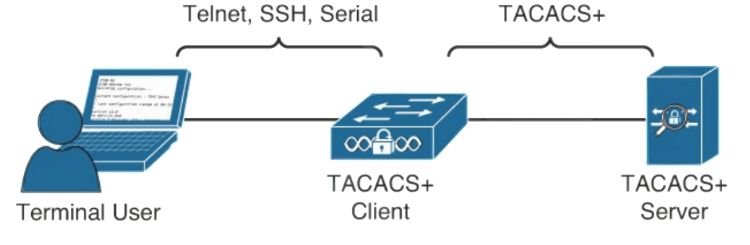
- Uses a single configuration file to:
- Control server operations
- Define users and attribute/value pairs
- Control authentication and authorisation procedures
- Allows each AAA component to be managed independently, providing greater flexibility.
- Uses TCP: reliable communication.